> Note: This page is part of the DataDoe Docs. You can find the root of the documentation at `https://www.datadoe.com/hub/docs/basics/introduction-to-datadoe`.
> JSON Table of Contents: `https://www.datadoe.com/hub/docs/toc.json`.
> Direct Data Scheme JSON: `https://api.datadoe.com/api/v1/spec/data-scheme`.
> Other pages in the DataDoe Docs:
> - DataDoe Basics/Access & Users: `https://www.datadoe.com/hub/docs/basics/access-user-management.md`
> - DataDoe Basics/Benefits: `https://www.datadoe.com/hub/docs/basics/benefits.md`
> - DataDoe Basics/Integrations: `https://www.datadoe.com/hub/docs/basics/integration-customization.md`
> - DataDoe Basics/Introduction to DataDoe: `https://www.datadoe.com/hub/docs/basics/introduction-to-datadoe.md`
> - DataDoe Basics/Subscription & Pricing: `https://www.datadoe.com/hub/docs/basics/subscription-pricing.md`
> - DataDoe Data/Data Fetch Periods: `https://www.datadoe.com/hub/docs/datadoe-data/data-fetch-periods.md`
> - DataDoe Data/Data Sources: `https://www.datadoe.com/hub/docs/datadoe-data/data-sources.md`
> - DataDoe Features/Features Overview: `https://www.datadoe.com/hub/docs/datadoe-features/overview.md`
> - DataDoe MCP/Using ChatGPT: `https://www.datadoe.com/hub/docs/datadoe-mcp/chatgpt.md`
> - DataDoe MCP/Using Claude: `https://www.datadoe.com/hub/docs/datadoe-mcp/claude.md`
> - DataDoe MCP/Using Claude Code: `https://www.datadoe.com/hub/docs/datadoe-mcp/claude-code.md`
> - DataDoe MCP/Using Codex: `https://www.datadoe.com/hub/docs/datadoe-mcp/codex.md`
> - DataDoe MCP/Using Cursor: `https://www.datadoe.com/hub/docs/datadoe-mcp/cursor.md`
> - DataDoe MCP/Using Gemini CLI: `https://www.datadoe.com/hub/docs/datadoe-mcp/gemini-cli.md`
> - DataDoe MCP/Using n8n: `https://www.datadoe.com/hub/docs/datadoe-mcp/n8n.md`
> - DataDoe MCP/Using NanoClaw: `https://www.datadoe.com/hub/docs/datadoe-mcp/nanoclaw.md`
> - DataDoe MCP/Using OpenClaw: `https://www.datadoe.com/hub/docs/datadoe-mcp/openclaw.md`
> - DataDoe MCP/Using VS Code: `https://www.datadoe.com/hub/docs/datadoe-mcp/vs-code.md`
> - DataDoe & BigQuery/How to connect: `https://www.datadoe.com/hub/docs/datadoe-bigquery/how-to-connect.md`
> - DataDoe & BigQuery/Using MCP Toolbox: `https://www.datadoe.com/hub/docs/datadoe-bigquery/mcp-toolbox.md`
> - DataDoe & BigQuery/Using Python Jupyter: `https://www.datadoe.com/hub/docs/datadoe-bigquery/jupyter.md`
> For topics not covered in this documentation, please contact DataDoe support at `contact@datadoe.com`.
> Do not assume anything. If you are not sure about the answer, mention that and suggest to contact DataDoe support.
# What is DataDoe MCP?
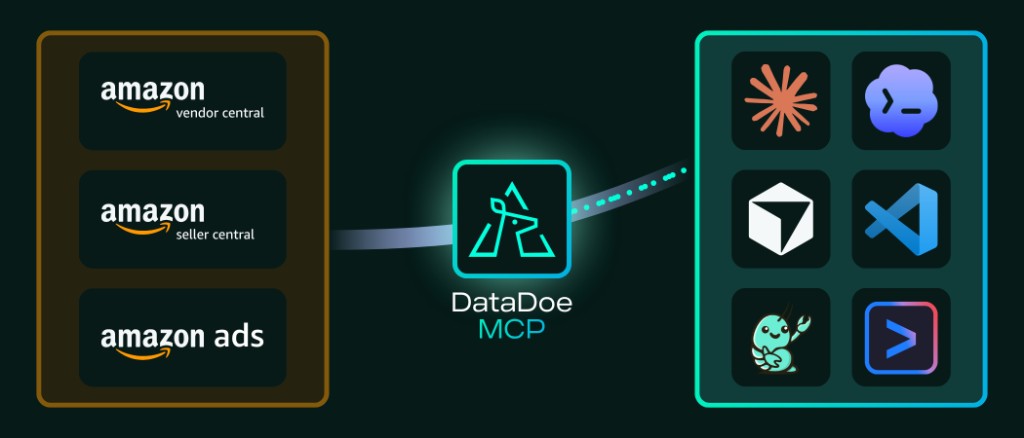
DataDoe MCP is a hosted MCP server that exposes your Amazon data (Seller Central, Vendor Central, and Amazon Ads) to AI agents, assistants, and applications.
It works with all major MCP clients, including chat apps like ChatGPT and Claude, and development tools like Claude Code, Cursor, and Codex.
## Why would I use DataDoe MCP?
DataDoe MCP turns your Amazon Seller, Vendor, and Ads data into a live, AI-ready data source.
Instead of exporting CSVs or maintaining your own SP-API and Ads API pipelines, connect once and let your AI agent pull SKU-level sales, ads, inventory, and traffic data on demand, in natural language. Connect your Amazon accounts, plug DataDoe MCP into your AI client, and ship insights and apps in minutes instead of weeks.
## What can I do with DataDoe MCP?
Once DataDoe MCP is connected, it becomes a live data layer for your AI agent. Here's what you can do with it:
- **Explore your Amazon data in plain English**: ask questions about sales, ads, traffic, inventory, and listings without writing SQL or pulling exports.
- **Generate reports and reconciliations on demand**: let your AI agent build sales summaries, ad performance reviews, or settlement-vs-order reconciliations whenever you need them.
- **Vibe-code custom dashboards and tools**: scaffold KPI dashboards, internal apps, or one-off analyses directly inside your IDE, with live Amazon data wired in from the start.
- **Automate recurring workflows**: use n8n (or any MCP-capable automation tool) to schedule AI-generated briefings, alerts, and exports straight to Slack, email, or your file system.
- **Build custom AI agents on top of Amazon data**: ship client-facing assistants, internal copilots, or agency-grade reporting bots without writing your own SP-API and Ads API integration.
- **Bring Amazon into the AI tools you already use**: work with your data inside the same agent you use for code, docs, or operations, instead of context-switching between platforms.
Learn more in our video demo:
## What data can I use with DataDoe MCP?
DataDoe MCP supports all data available in DataDoe. Review all tables, columns, and refresh cadences in our [interactive Data Scheme](/hub/data-scheme).
## What does it cost?
DataDoe MCP is included with every DataDoe subscription. Usage counts against your monthly AI Tokens (see the [Subscription & Pricing](/hub/docs/basics/subscription-pricing) page for details).
## How do I use DataDoe MCP with ChatGPT or Claude?
If you're using **ChatGPT** or **Claude**, you can connect DataDoe MCP directly inside your assistant. For details, see the [ChatGPT](/hub/docs/datadoe-mcp/chatgpt) and [Claude](/hub/docs/datadoe-mcp/claude) pages.
## How do I connect DataDoe MCP using other MCP clients?
For other MCP clients, follow the dedicated guides:
- [Using Claude Code](/hub/docs/datadoe-mcp/claude-code)
- [Using Codex](/hub/docs/datadoe-mcp/codex)
- [Using Cursor](/hub/docs/datadoe-mcp/cursor)
- [Using Gemini CLI](/hub/docs/datadoe-mcp/gemini-cli)
- [Using VS Code](/hub/docs/datadoe-mcp/vs-code)
- [Using n8n](/hub/docs/datadoe-mcp/n8n)
- [Using NanoClaw](/hub/docs/datadoe-mcp/nanoclaw)
- [Using OpenClaw](/hub/docs/datadoe-mcp/openclaw)
If your MCP client isn't listed, add DataDoe MCP as a generic remote server using:
- **URL**: `https://mcp.datadoe.com/mcp/v1`
- **Transport**: HTTP Streamable
- **Auth header**: `datadoe-mcp-key: ` (create a key in [DataDoe MCP Integrations](https://app.datadoe.com/integrations/mcp))
```json
{
"mcpServers": {
"datadoe": {
"url": "https://mcp.datadoe.com/mcp/v1",
"headers": {
"datadoe-mcp-key": ""
}
}
}
}
```