%20--%3e%3cdefs%3e%3cstyle%3e%20.st0%20{%20fill:%20%2303897c;%20}%20.st1%20{%20fill:%20%23fff;%20}%20%3c/style%3e%3c/defs%3e%3cg%3e%3ccircle%20class='st0'%20cx='-44'%20cy='24'%20r='24'/%3e%3ccircle%20class='st1'%20cx='-40.57'%20cy='22.94'%20r='1.25'/%3e%3cpath%20class='st1'%20d='M-24.96,20.99l-22.47-4.94-.36-4.47c-.18-2.28-1.89-4.12-4.15-4.48l-5.3-.84.35,5.36c.15,2.28,1.82,4.15,4.08,4.55l3.96.69-6.31,28.39c.44.23.89.45,1.34.65l6.31-28.38,21.1,4.64v3.17l-13.15,5.14,3.57,16.16c.46-.16.92-.34,1.37-.53l-3.25-14.73,12.92-5.05v-5.33ZM-52.57,14.74c-1.59-.28-2.77-1.6-2.88-3.21l-.23-3.55,3.51.56c1.6.25,2.8,1.55,2.93,3.16l.3,3.67-3.63-.63Z'/%3e%3c/g%3e%3cg%3e%3ccircle%20class='st0'%20cx='24'%20cy='24'%20r='24'/%3e%3cpath%20class='st1'%20d='M24,48c3.33,0,6.49-.68,9.37-1.9l-3.25-14.73,12.92-5.05v-5.33l-22.47-4.94-.36-4.47c-.18-2.28-1.89-4.12-4.15-4.48l-5.3-.84.35,5.36c.15,2.28,1.82,4.15,4.08,4.55l3.96.69-6.31,28.39c3.34,1.76,7.13,2.76,11.16,2.76Z'/%3e%3ccircle%20class='st0'%20cx='27.43'%20cy='22.94'%20r='1.25'/%3e%3c/g%3e%3c/svg%3e)
Amazon reports. Ready in seconds.
Copy a ready-made Looker Studio report and connect it to your DataDoe BigQuery dataset. You will get a working dashboard in minutes.
Your reports ready in seconds
Pick a template, let DataDoe prepare it, and start exploring your business.
- Step 1
Pick a report
Choose one of the ready-to-use Looker Studio reports below and click I want it!.
- Step 2
DataDoe prepares your report
Your report will be ready in a few seconds. If your organization's BigQuery integration isn't set up yet, DataDoe will guide you through enabling it.
- Step 3
Use your report
The report is ready. May the numbers be with you!
Reports Gallery
Check our ready-to-use reports. Made for DataDoe. Tailored to your business.
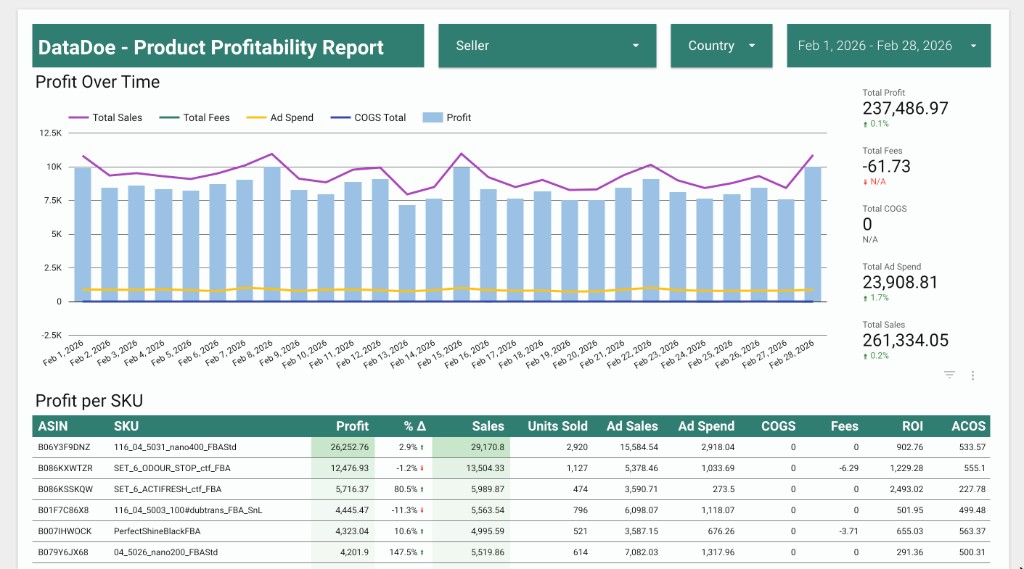
Product Profitability Report
See profit by product with a clear breakdown of sales, costs, fees, and margins. Built for quick weekly reviews.