














Setup tutorial@jakobowsky
DataDoe Hub
The Amazon data layer for AI agents.
Seller Central, Vendor Central, and Amazon Ads in one MCP server. Plus a REST API and BigQuery integration when you need to go deeper.
- 0
- Amazon data tables
- 6+
- Marketplaces covered
- All
- Supported AI clients
- Live
- Always syncing
Setup
Connect once. Build forever.
Three steps. About 30 seconds. Works with every MCP-capable AI client.
1
Connect Amazon
Sign up at app.datadoe.com and authorize your Seller Central, Vendor Central, or Ads accounts.
2
Get your MCP key
In DataDoe, open Integrations > MCP and generate a key. Scoped to your organization, revocable anytime. Claude (including Claude Code) and ChatGPT can skip this step - they sign in with OAuth instead.
3
Paste into your AI client
Pick a client and follow its guide. Most copy a snippet and swap the key in; Claude and ChatGPT connect with an OAuth sign-in. Your agent gets every Amazon data table.
Or skip ahead to your AI client →
Data
Full data scheme →Every Amazon table, one schema.
238 clean tables across Seller Central, Vendor Central, and Amazon Ads. Documented down to the column, refreshed automatically.
Seller Central
102 tables- Profit by SKU & DateContinuous load
- Profit by DateContinuous load
- Sales & Traffic by ASIN & DateDaily
- Order Line ItemsDaily
AI Skills
All skills →Skills that ship work.
Pre-built workflows for your Amazon AI agent. Install one into Claude Code, Codex, or OpenClaw.
PPC Bid Optimizer
Recompute Sponsored Products keyword bids toward a target ACoS and apply them through DataDoe Actions - always a dryRun preview first, and a real change only on your explicit approval. The write follow-through to the wasted-spend watchdog. Live from DataDoe, runs in chat. Use for "optimize bids", "fix ACoS", "lower my bids", "raise bids on winners", "adjust keyword bids", or "bid optimization".
PPC & AdsWrite · approval-gated
Open skillPPC Negative Keyword Applier
Find the exact Sponsored Products search terms burning budget with no sales, then add them as negative keywords through DataDoe Actions - always a dryRun preview first, and a real change only on your explicit approval. The write follow-through to the wasted-spend watchdog. Live from DataDoe, runs in chat. Use for "wasted ad spend", "add negative keywords", "negate search terms", "search terms with no sales", "stop paying for these clicks", or "clean up my PPC".
PPC & AdsWrite · approval-gated
Open skillAmazon ASIN Search Auditor
Audit an Amazon seller's organic and sponsored search visibility by combining DataDoe search-term data, live Amazon search results, owned-ASIN matching, screenshots, and a reusable dashboard report. Use when asked to run an Amazon ASIN/search visibility audit for a specific DataDoe seller.
Search & SEORead-onlyReport
Open skillData Studio
All templates →Dashboards, pre-built.
Data Studio templates wired to your DataDoe BigQuery dataset. Copy, connect, share.
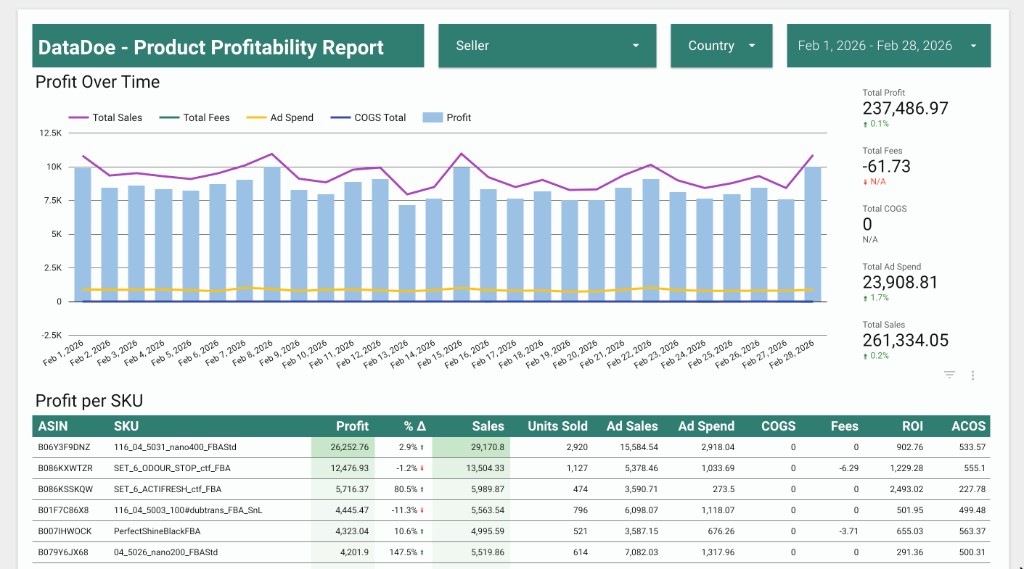
Product Profitability Report
See profit by product with a clear breakdown of sales, costs, fees, and margins. Built for quick weekly reviews.
Open templateComing soon
More dashboards in the works.
Coming soon
More dashboards in the works.
Videos
Watch the team build.
Setup walkthroughs, MCP client tutorials, and skill demos. Build alongside the DataDoe team.
Setup tutorial@jakobowsky
Claude for Amazon Sellers: Run Your Whole Account with AI (2026)
PPC tutorial@jakobowsky
How to Automate Amazon PPC with Claude AI (2026)
FAQ
Questions, answered.
How is DataDoe different from Amazon's own MCP server?+
Amazon ships an official MCP server, but only for Amazon Ads. DataDoe covers the full Amazon stack (Seller Central, Vendor Central, and Amazon Ads) and stores everything in a structured BigQuery layer, retained from the day you connect and refreshed daily.
What's the rate limit?+
DataDoe applies separate rate limits per Organization. The default is 3 requests per second for the REST API and 5 requests per second for MCP. Rate limits can be increased on request for selected Organizations. Exceeding your limit returns HTTP 429 with Retry-After: 1. The response message shows your effective limit. Amazon SP-API throttling is handled server-side. MCP exports are capped at 5,000 rows per call; paginate with the "skip" parameter for larger result sets. REST API exports have no row cap.
How is data security handled?+
DataDoe handles SP-API developer registration, OAuth, and refresh-token rotation on our infrastructure. Your Amazon credentials never leave DataDoe. MCP API keys are scoped to your organization and revocable from app.datadoe.com/integrations/mcp.
Which AI clients are supported?+
Claude (web, Desktop, and Claude Code), ChatGPT, Cursor, Codex, Gemini CLI, VS Code (GitHub Copilot), OpenCode, OpenClaw, NanoClaw, Hermes Agent, CrewAI, n8n, Gumloop, and Microsoft 365 (Excel, Word, PowerPoint) via the Claude add-in. DataDoe MCP is a standard Streamable HTTP MCP server, so any MCP-compatible client works.
Can't find your answer? Browse the docs →